
Avaz AAC
Avaz, LLCEducation
3.464.00 Reviews
- Version
- 8.0.4
- Installs
- 100.00K
- Age Rating
- Everyone
Screenshots
Our Review of Avaz AAC
 Analysis by Appyee
I came away from Avaz AAC thinking of it less as a conventional learning app and more as a communication tool that needs to fit one person closely. It is an education app from Avaz, LLC, designed around augmentative and alternative communication, or AAC. In practical terms, it gives a user another way to express needs, choices, feelings, and ideas through a device when speaking is difficult, unreliable, or unavailable.
That distinction matters. This is not an app I would recommend simply because someone wants to “learn faster” or try a few educational activities. Its value depends on how well its communication setup matches the user, the people around them, and the situations where they need a voice. I found the strongest part of the experience to be its focus on customization, expressive voice tones, and multilingual communication. I also found that those strengths come with a learning curve: the app is more useful when a caregiver, teacher, speech-language professional, or experienced user is willing to shape it carefully.
It is free to install and suitable for Everyone, although optional purchases range from a small amount to considerably more per item. The app has passed the hundred-thousand-install mark, carries an average rating of 3.4 from roughly four hundred ratings, and currently appears as version 8.0.4. Those figures suggest a real user base, but also a mixed experience rather than universal satisfaction. I would treat it as a tool to evaluate with a particular communicator in mind, not as a one-size-fits-all solution.
How Avaz AAC feels to use across different abilities and settings
I look at Avaz AAC as a system that has to travel with the communicator, not just work in a quiet practice session. In this section, I consider how changes in ability, surroundings, and conversation partners can affect whether its customizable setup remains usable. I also want to focus on a practical habit that helps reveal what needs adjusting: noticing the moments when communication is easiest, then carrying those successful choices into the next setting.
Readability and navigation need to match the communicator
The first thing I would pay attention to is not the number of available words, but whether the person can understand what is on screen and reach it without unnecessary effort. AAC interfaces can become overwhelming when every possible option is visible at once. A customizable layout is therefore more than a cosmetic benefit: it can make the difference between a message being available and a message being effectively hidden.
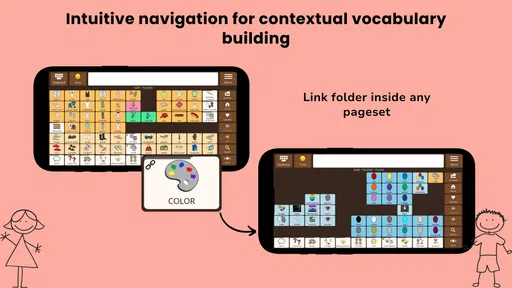
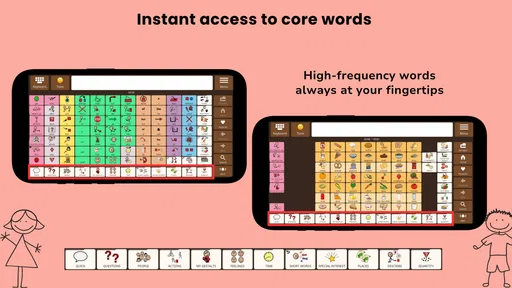
Avaz AAC is built around that idea. Its customization lets the communication system be shaped around the user rather than forcing every person into the same vocabulary arrangement. For a beginner, I would start with a small, practical set of words and phrases connected to immediate routines: food, drink, bathroom, pain, help, yes, no, family, school, and preferred activities. Once those choices become familiar, I would expand gradually instead of filling the screen with possibilities on the first day.
This gradual approach is one of the less obvious advantages of a customizable AAC app. A large vocabulary may look impressive, but it is not automatically more accessible. A child who can quickly find “music” and “again” may communicate more successfully than a child who technically has hundreds of words available but cannot locate them under pressure. I would review the arrangement with the user, watching for repeated hesitation, accidental selections, or categories that make sense to an adult but not to the person using them.
Readability also includes the language used around the symbols or words. A caregiver may understand a category label immediately, while a young user may associate the same idea with a favorite object, person, or routine. I would use the customization tools to reflect that personal vocabulary wherever possible. This is especially important for users with cognitive, developmental, or language-processing differences, because familiar organization can reduce the mental work needed before a message is produced.
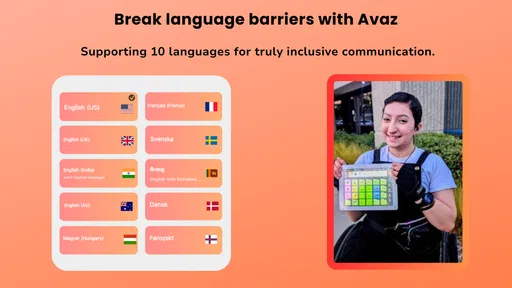
The app’s multilingual support is another meaningful part of navigation. For a bilingual household, communication should not have to stop at the language used in school or therapy. A child may understand one language best with a parent and another in the classroom. Having the system support more than one language can make the device feel connected to real life instead of treating one language as the only legitimate setting.
Still, multilingual support needs thoughtful setup. Switching languages, maintaining consistent meanings, and teaching family members how to respond can create extra work. I would not assume that adding another language automatically makes communication smoother. The most useful arrangement will depend on who speaks which language with the user and whether the vocabulary is equally relevant in each environment.
Motor and sensory needs deserve hands-on testing
Touchscreen AAC can be empowering, but it also places demands on pointing, timing, visual attention, and tolerance for screen activity. A person with limited fine-motor control may need a larger, simpler arrangement. Someone who makes involuntary movements may need a setup that reduces accidental choices. A user with visual or sensory sensitivities may find dense screens, frequent changes, or a voice output unpleasant.
I would test Avaz AAC in short sessions before making it part of every routine. I would watch whether the user can select a desired item deliberately, whether neighboring choices are too easy to hit by mistake, and whether the visual presentation remains understandable when the person is tired. A setup that works perfectly at a table may not work during a busy morning, in a moving vehicle, or when the user is upset.
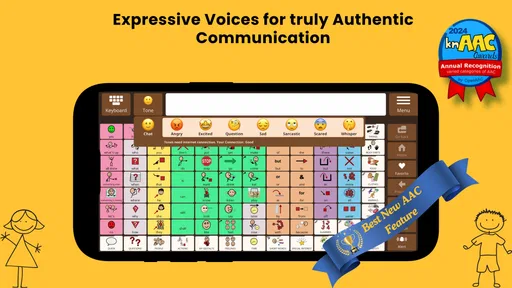
Voice output is not a minor detail. The app emphasizes expressive voice tones, and that can help communication feel less flat or mechanical. For some users, a more expressive voice may better convey excitement, frustration, humor, or urgency. It may also make it easier for listeners to recognize that the device represents a real person’s intention rather than a generic prompt.
At the same time, expressive output will not suit everyone equally. Some users may prefer a calmer or more predictable voice, particularly in noisy environments or when sensory load is already high. I would let the communicator choose whenever possible. If the user cannot easily explain a preference, I would observe reactions: turning away, refusing to use the app, covering ears, or becoming more engaged can all provide useful clues.
A practical tip is to separate motor testing from language teaching. First, check whether the person can reach and select the intended area comfortably. Then consider whether the words and categories make sense. If both are changed at once, it becomes difficult to tell whether a problem comes from the physical layout or the vocabulary. This two-step review can save a great deal of frustration for families and educators.
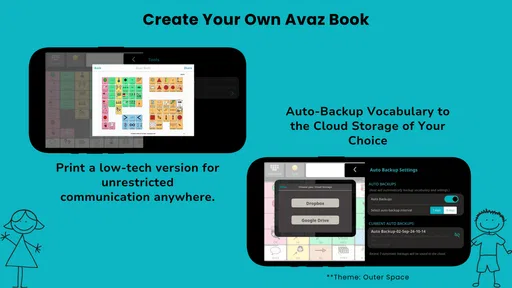
I would also keep a backup communication plan. A phone or tablet can run out of power, be left in another room, or become unusable after a fall. Avaz AAC may be central to someone’s communication, but it should not be the only available route to express an urgent need. Printed symbols, familiar gestures, writing, sign language, or a simple low-tech board can provide important support when technology is unavailable.
Situational access is where the app proves its value
The most convincing way to judge an AAC app is to imagine ordinary moments rather than a quiet demonstration. Consider a child arriving at school after a poor night’s sleep. They may need to say “I need a break,” tell an aide that something hurts, or reject an activity. If those messages are easy to find, the app supports independence. If the child must navigate through several unrelated screens while overwhelmed, the same device may become another obstacle.
For that reason, I would create situation-based pathways rather than relying on one general arrangement. A home routine might prioritize food, clothing, family members, and preferred entertainment. A classroom setup might make “help,” “finished,” “wait,” “I don’t understand,” and subject-specific vocabulary easy to reach. A medical visit could require words for pain, body parts, medication, and consent. The goal is not to make separate personalities, but to make relevant communication available when attention is limited.
This is also where expressive voice tones can help. A message such as “I’m excited” or “That hurts” carries more than its words. Tone can help listeners respond appropriately, especially when they do not know the user well. However, listeners still need to learn to wait, listen, and avoid answering for the person. No interface can solve a communication breakdown caused by impatient conversation partners.
Multilingual support may be particularly useful during family gatherings, travel, or appointments involving relatives who do not use the user’s primary school language. I would practice these transitions before an important event. If the user has to search for the language control in a stressful moment, the feature may be technically present but practically out of reach. Rehearsal can make the difference between a helpful option and an unused one.
Another useful workflow is to involve the user in reviewing the vocabulary after real events. If they tried to communicate something but could not find the right word, note the situation and add or reposition that concept later. If a word is never used, ask whether it is unnecessary, hard to find, or simply not meaningful to that person. This turns everyday experience into ongoing customization instead of treating the initial setup as permanent.
I would also introduce the app to communication partners, not just the primary user. Parents, teachers, siblings, therapists, and support staff should know how to give the user enough time, how to confirm a message without guessing, and how to model use without taking control. A well-organized AAC system can still fail if everyone around the communicator treats it as a button for requesting objects rather than a full language tool.
What may still create barriers
The biggest barrier is likely to be setup and maintenance. Customization is valuable because people communicate differently, but it requires decisions. Someone has to choose useful vocabulary, organize it, explain it to others, and revise it as the user’s interests and abilities change. Families looking for an instant, ready-made solution may find this demanding.
There is also a risk of designing the system around what caregivers want the person to say. I would avoid turning the app into a menu of compliant answers such as “yes,” “no,” and “good job.” The user needs ways to reject, question, joke, comment, complain, and start a conversation. An inclusive setup should support agency, not merely make routines easier for adults.
The average rating of 3.4 indicates that the experience is not consistently smooth for every reviewer. I would take that as a reason to test the app against the user’s actual needs rather than assuming the description tells the whole story. Device behavior, individual motor ability, preferred language, and the quality of the initial configuration can all affect whether an AAC app feels usable.
The purchase structure deserves attention as well. Although the app is free to install, optional in-app purchases can reach up to $299.99 for an individual item. That does not automatically make it poor value, especially if the app becomes an important communication aid, but it does mean families should inspect the available options before committing to a long-term setup. I would involve the person who manages the budget and avoid treating a paid feature as necessary until its practical benefit is clear.
Compatibility is another point to check before relying on it. The listed minimum operating system is iOS 9 or later, so anyone using an older device should verify that the app can be installed and run properly. Even when the operating system is supported, an older phone or tablet may be less comfortable for extended communication because of screen size, battery condition, or general responsiveness. Those physical factors matter as much as the app itself.
I would not choose Avaz AAC for someone who only needs occasional text-to-speech, quick note taking, or a basic pronunciation aid. A simpler tool may be faster for a person who can type comfortably and does not need a structured AAC vocabulary. Likewise, if a user already has a communication system that they know well and that works across their home, school, and community, changing systems may cause more disruption than benefit.
Professional guidance can also matter. I would welcome input from a speech-language professional or occupational therapist when motor access, language development, or complex communication needs are involved. The app can be part of a broader communication plan, but it should not be expected to replace individualized assessment. The best configuration is not necessarily the one with the most categories or the most sophisticated voice; it is the one the user can access and wants to use.
My inclusive verdict after looking beyond the feature list
I see Avaz AAC as a promising option for people who need an adaptable communication system and may benefit from expressive voice output or more than one language. Its strongest quality is that it invites personalization. That makes it relevant to a wide range of abilities, but it also means the quality of the experience depends heavily on the care put into setup.
For a family beginning AAC, I would download it and test a small, meaningful vocabulary with the intended user. I would begin with real messages rather than drills, observe how the person handles the screen, and ask whether the voice feels comfortable. I would then try the same arrangement in at least two different settings, such as home and school, before expanding it. That process gives a more honest answer than judging the app during a quiet first session.
For a bilingual household, I would specifically test whether switching between languages supports natural conversations rather than creating extra searching. For a user with motor or sensory differences, I would prioritize reliable selection and comfortable output over a visually impressive vocabulary. For a caregiver, I would consider the time needed to maintain the system and the cost of optional purchases. These are not side issues; they determine whether the app remains useful after the initial enthusiasm fades.
My recommendation is therefore positive but conditional. Avaz AAC is worth exploring when communication needs are personal, ongoing, and likely to benefit from customization. It is less suitable when someone wants a minimal text-to-speech utility, cannot devote time to tailoring the system, or already depends successfully on another AAC method. The right test is not whether the app contains many communication choices, but whether one specific person can use it to say what matters at the moment it matters.
That is the standard I would use before making it a daily communication partner. If the layout becomes familiar, the voice feels acceptable, and the people around the user learn to listen without taking over, the app can support more independent participation in home, school, and community life. If those conditions are not met, a different AAC approach may be kinder and more effective, even if it appears less feature-rich.
Verdict
Strengths of Avaz AAC
- Personalized communication boards support individual vocabulary and routines.
- Picture-based and text-to-speech options suit different communication abilities.
- Useful tools for caregivers, teachers, and speech-language professionals.
- Offline access helps users communicate without a constant internet connection.
- Progress and customization features can support consistent therapy practice.
Limitations of Avaz AAC
- The full feature set may require a costly subscription or in-app purchase.
- Initial board setup can take considerable time for caregivers and therapists.
- Some voices and pronunciation may sound less natural than expected.
- Advanced customization may feel overwhelming for first-time AAC users.
- Device compatibility and performance can vary across older phones and tablets.
Similar Picks in This Category
View All
Duolingo: Language Lessons
Duolingo4.7

Google Classroom
Google LLC2.8

Unacademy: Learn & Crack Exams
Unacademy3.2

Bible App for Kids
Life.Church4.4

Cake - Learn English & Korean
Cake Corp.4.7

Brainly: AI Homework Helper
Brainly4.5
Frequently Asked Questions
What is Avaz AAC and who is it designed for?
Avaz AAC is an augmentative and alternative communication app designed to help people who have difficulty speaking communicate using a tablet or smartphone. It is commonly used by children and adults with autism, apraxia, cerebral palsy, Down syndrome, speech delays, or other communication challenges. Users can select symbols, pictures, words, or phrases to express needs, feelings, ideas, and everyday messages.
How does Avaz AAC help users communicate?
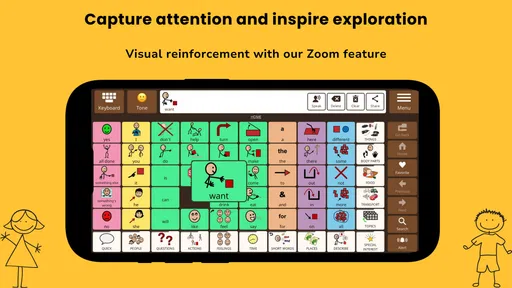
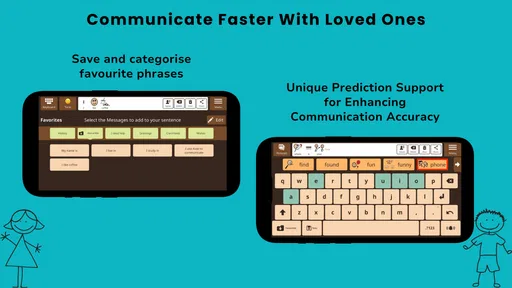
The app provides a customizable communication system based on visual symbols and text. A user can tap individual icons or combine them into sentences, after which the app can speak the message aloud using text-to-speech. Avaz AAC also supports vocabulary organization and personalized pages, allowing caregivers, teachers, or speech-language professionals to adapt the layout, language level, and available words to match the user’s abilities and development.
Can Avaz AAC be customized for different users and communication levels?
Yes. One of Avaz AAC’s most useful features is its flexibility. Caregivers and professionals can adjust vocabulary, categories, button layouts, images, and communication pages as the user progresses. The app can support early communication with simple picture choices and later introduce more words, sentence building, and literacy-based communication. This customization is important because communication needs vary significantly from one person to another.
Does Avaz AAC work without an internet connection?
Many core communication functions can generally be used offline once the necessary content and voice resources have been installed, which is helpful at school, during travel, or in places with unreliable connectivity. However, certain features may require internet access, including downloading updates, accessing account-related services, obtaining additional content, or using cloud-based options. It is recommended to configure and test the app before relying on it in an important situation.
Is Avaz AAC free, and does it replace speech therapy?
Availability, pricing, trials, and included features may vary depending on the platform, region, and subscription or purchase option shown in the official store. Avaz AAC should be viewed as a communication aid rather than a replacement for professional speech and language support. A speech-language pathologist, teacher, or qualified caregiver can help select suitable vocabulary, configure the interface, and teach the user how to communicate effectively with the app.
